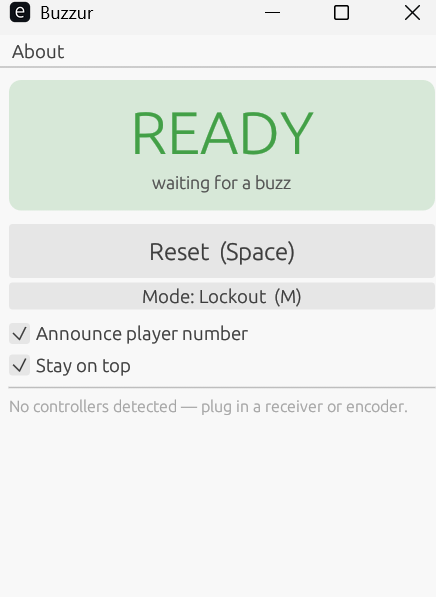
Buzzur waiting for a buzz. The banner turns into a big color-coded “PLAYER 3” the instant someone rings in.
A small, fast quizbowl lockout buzzer system for Windows. Free to download.
Buzzur is a program that lets your laptop control USB buzzer systems, most notably the Buzz controllers for PlayStation 2. These controllers can often be found on eBay and other sites for less than $30, meaning you can use this system to have a fully functional buzzer set for much cheaper than a conventional quizbowl buzzer. It also experimentally supports even cheaper arcade control systems, read on for more info. Buzzur is a successor to PACEBuzz. It is written in Rust to be faster (and thus more fair) and now supports both Windows and Mac. Unlike most regular buzzers, it also supports a buzzer queuing mode ideal for shootouts where the moderator can move to the next person in the queue.
Buzzur waiting for a buzz. The banner turns into a big color-coded “PLAYER 3” the instant someone rings in.
Jump to: Download · What it does · What you need · Using it · FAQ
Download Buzzur for Windows (version 1.0 · ~5 MB · Windows 10/11, 64-bit)
A single file: no installer, no dependencies. Save it anywhere and double-click to run. Windows SmartScreen may still warn that it's from an unrecognized publisher; choose More info → Run anyway. Plug in your controller first, or any time while it's running.
Download Buzzur for macOS (version 1.0 · ~4 MB · universal, Intel & Apple Silicon)
Unzip it and drag Buzzur.app into your Applications folder. The first time you open it, macOS will say it's from an unidentified developer (the app isn't notarized yet), so right-click the app and choose Open, then confirm. After that it launches normally.
Buzzur works with off-the-shelf USB controllers. You don't have to build anything. The easiest path is a set of PlayStation 2 Buzz! controllers, which show up used for very little.
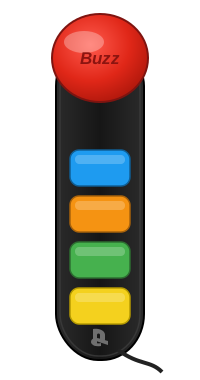
A Buzz! buzzer. The big red button rings in; the four colored buttons are used in queue mode and buzzer check.
The Buzz! quiz games for the PlayStation 2 came with sets of four big-red-button buzzers on a single USB plug, each with a light Buzzur can control. They're perfect for this and turn up cheaply secondhand.
You can buy a USB arcade encoder and a few arcade buttons for as little as $25 (see this Amazon link). We're working on validating the cheapest solution that will support the lockout lighting you expect of a quizbowl system. But these are functional by calling out the buzzer number on the buzz, similar to some real quizbowl buzzer systems such as The Knot. Note that most of these systems usually come with very short wires. Once we have a system we're fully happy with, we'll update this page with a recommended set of plug-and-play things to buy.
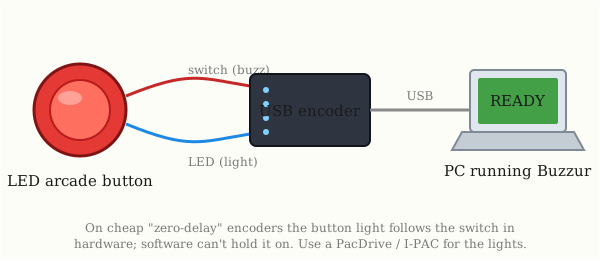
How a DIY arcade buzzer is wired: each button goes to a USB encoder that the PC sees as an ordinary game controller.
What you need for a basic build:
Two things to know about the lights:
A controllable-lights version driven by a Raspberry Pi (buttons and LEDs wired straight to its pins) is in the works.
Plug in a controller and run buzzur.exe. The window shows
READY until someone buzzes. Moderator controls:
The same controls are available as on-screen buttons and checkboxes, so a mouse works too. New controllers are picked up automatically a second or two after you plug them in, with no need to restart.
There are Windows and macOS downloads above. The Mac build is a universal app that runs on both Intel and Apple Silicon. Linux isn't packaged here but builds from source. The spoken-number feature uses each system's built-in voice.
Buzzur is signed, but not yet with a certificate from a commercial authority, so SmartScreen still flags it as from an unrecognized publisher. That's expected for small free tools. Choose More info → Run anyway. If you'd rather be cautious, scan it first.
Four per Buzz! set, and you can connect several sets at once. Arcade encoders add as many players as you have buttons wired.
Email me at bentley.michael.j@gmail.com. Updates will be posted here at www.doc-ent.com.